 Olly Mooney
An MCP server is a small piece of software that sits in front of one of your business systems and lets an AI assistant such as Claude, ChatGPT or Microsoft Copilot look things up in it and, only where you allow it, make changes. It is safe when it has proper sign-in, narrow permissions, a log of every call and a person approving anything that matters. Without those, it is not.
You have probably heard the term from a software supplier, or from someone on your team who wants the AI to “just see the CRM”. This guide explains what an MCP server does, gives six uses we think are safe for a UK business, and covers build versus buy, hosting, cost and when not to bother. Product facts were checked against each vendor’s own documentation on 20 November 2026.

What an MCP server is, in plain English
MCP stands for Model Context Protocol. Anthropic, the company behind Claude, published MCP as an open standard on 25 November 2024, two years to the day before this post went live. In December 2025 Anthropic donated it to the Agentic AI Foundation, a fund under the Linux Foundation that it co-founded with Block and OpenAI. No single AI company owns it now.
The project’s own documentation compares MCP to a USB-C port for AI applications: one standard plug instead of a different cable for every device. Before it existed, connecting an assistant to your order system meant a separate custom integration for each AI product. Now you build one connector, the MCP server, and any assistant that speaks the protocol can use it.
According to the current MCP specification, dated 28 July 2026, an MCP server can offer three things:
- Tools: functions the AI can call, such as “find customer” or “create quote”.
- Resources: data it can read, such as a price list or a policy document.
- Prompts: reusable templates for common jobs.
A local MCP server runs on one person’s computer. A remote MCP server runs on a web host and is reached over the internet, so a whole team can share it. For a business, remote is nearly always the one that matters, because it can have proper sign-in and one central log.
Which AI products can connect to an MCP server
We only list products whose own documentation says so:
- Claude. Anthropic’s help centre says custom connectors, its name for a remote MCP server you add yourself, are available on its Free plan (limited to one) and on its paid plans.
- ChatGPT. OpenAI’s developer documentation describes adding a custom MCP server to ChatGPT as a plugin, and calling one from its API.
- Microsoft Copilot Studio. Microsoft Learn documents a wizard for connecting an agent to an existing MCP server. That is Copilot Studio, Microsoft’s agent-building tool, not every product with Copilot in the name.
Names and plan rules change often, so treat that list as a snapshot. Our pages on ChatGPT apps and Claude connectors and Copilot Studio agents go further into each.
Is it safe? Three risks to understand first
The specification says tools “represent arbitrary code execution” and that the AI application must get the user’s explicit consent before using one. It also admits the protocol cannot enforce those principles itself. That job falls to whoever builds the MCP server and the AI product that connects to it. Safety is a build-quality question, not a feature you get for free.
Authorisation: who is asking?
The specification makes authorisation optional. Any MCP server that touches real data should have it anyway. For remote servers it is based on OAuth 2.1, the same family of standards behind “Sign in with Microsoft”. Each person signs in with their normal work account, so the AI sees only what that person could already see, and leavers lose access. Avoid one shared key for the whole company on anything sensitive: the log cannot tell you who did what.
Prompt injection: text that gives orders
An AI model reads everything as text. It cannot reliably tell your instructions from instructions hidden in an email, a web page or a PDF it has been asked to read. OpenAI’s documentation warns that an attacker can use this to trick a model into fetching sensitive data through a connected MCP server. OWASP ranks prompt injection first in its 2025 Top 10 for LLM Applications. There is no complete fix. The defence is limiting what the AI can do when it is fooled.
Least privilege: the smallest set of keys
The project’s security best practices recommend a least-privilege model: begin with a minimal set of low-risk read permissions, add more only when needed, and avoid catch-all “full access” scopes. In plain terms, reading an order and refunding an order are separate permissions, and the second needs a person to approve it.
Every use below follows the same five rules:
- Read-only first.
- Each person signs in as themselves.
- Write actions are added one at a time, with human approval for anything irreversible.
- Every call is logged: who, which tool, when and what came back.
- Text from emails, uploads and websites is treated as data, never as instructions.
6 safe ways to use an MCP server in your business
These are examples of what we would build, not client stories. The pattern is the same in each: the AI gathers and drafts, and a person makes the call.
| Connect AI to | Safe first step (read-only) | Keep behind human approval |
|---|---|---|
| 1. CRM | Account history, notes, open tasks | Editing records, emailing customers |
| 2. Order system | Order status, stock levels | Refunds, cancellations, address changes |
| 3. Accounts package | Invoice and payment status | Posting invoices, credit notes, payments |
| 4. Knowledge base | Searching policies and manuals | Editing or publishing documents |
| 5. Booking system | Checking availability | Making, moving or cancelling bookings |
| 6. Website | Sales and enquiry reports | Publishing content, changing prices |
1. CRM: account briefings without the copy and paste
- What it does: an account manager asks what has happened with a customer this quarter and gets orders, notes and open tickets in one summary.
- What could go wrong: a salesperson sees accounts they should not, or a note field contains text written to manipulate the AI.
- Keep it safe: permissions follow the signed-in person, fields the job does not need (bank details, dates of birth) are masked, and “add a note” arrives later as its own tool.
2. Order system: where is my order?
- What it does: customer service asks for the status of an order, or a list of everything running late.
- What could go wrong: a refund tool is triggered by a cleverly worded customer message, or a chatty assistant hammers an old ERP.
- Keep it safe: the assistant can read an order but cannot refund one. Refunds go to an approval queue, and rate limits protect the system behind it.
3. Accounts package: who owes us money?
- What it does: lists invoices more than 30 days overdue, shows who has been chased, and drafts chaser emails for a person to send.
- What could go wrong: language models are poor at exact arithmetic, and any tool that can post a payment or change bank details is a fraud target.
- Keep it safe: read-only access, totals calculated by the accounts software and not by the model, and no payment or bank detail tools at all.
4. Knowledge base: answers from your own documents
- What it does: staff ask a question in plain English and get an answer from your policies, manuals and past jobs, with a link to the source.
- What could go wrong: the answer comes from an out-of-date version, or the HR folder becomes visible to everyone.
- Keep it safe: point it at specific, tidy libraries, keep each person’s existing permissions and require source links. This is the lowest-risk use and usually the best place to start.
5. Booking system: availability on request
- What it does: the assistant checks the diary and proposes slots. With approval, it makes the booking.
- What could go wrong: double bookings, the wrong appointment cancelled, or one customer’s details shown to another.
- Keep it safe: availability is read-only. Create, move and cancel are three separate tools, each with a confirmation step.
6. Website: reports and drafts, not live edits
- What it does: answers questions such as last month’s sales by week or which pages have not been updated in a year, and drafts new copy.
- What could go wrong: something wrong goes live, a price changes, or customer orders are exposed.
- Keep it safe: reports are read-only and content changes are saved as drafts for a person to publish.
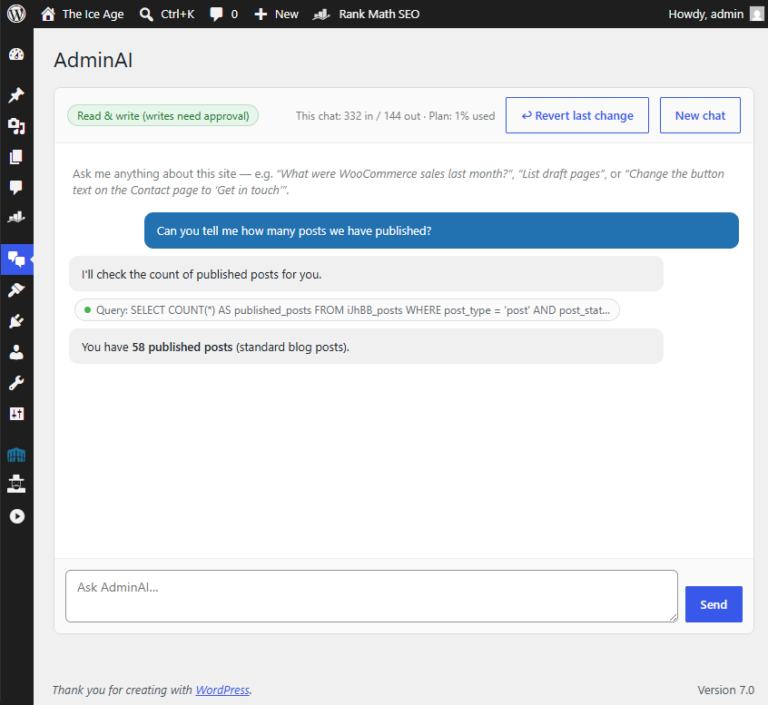
If the site is WordPress you may not need a custom build. AdminAI puts an assistant inside the dashboard and asks before it changes anything. See our introduction to AdminAI.
Build or buy: three routes to an MCP server
| Route | Good when | Watch for |
|---|---|---|
| Your software supplier’s own connector | Your CRM or accounts vendor publishes one, for example in Anthropic’s Connectors Directory or OpenAI’s plugin directory | What it can write as well as read |
| A third-party or open-source MCP server | You have someone technical who can read the code and host it | Who runs it, and who controls changes to it |
| A custom build | The system is in-house, old or has no connector, or you need permissions and logs that match your own rules | Scope: start with one system, read-only |
Buy first if a good official connector exists. It is cheaper and somebody else maintains it.
Be careful with the middle route. OpenAI, Anthropic and Microsoft all say the same thing in their documentation: only connect to an MCP server you know and trust. Microsoft adds that you should review the tools it exposes, confirm who operates it and check again regularly, because the operator can change those tools later.
Building makes sense when the system is yours. Our sister site dijitul developments offers MCP server development on that basis: a written tool catalogue, sign-in through Microsoft Entra ID or Google Workspace, read-only tools first and an audit log of every call. You own the code. If the AI will only ever live inside your own application, plain AI integration without MCP is usually simpler.
Where an MCP server should be hosted
Not on a laptop under a desk. A remote MCP server is a production web service that can read your data, so it needs at least the same care as your website.
Anthropic says Claude connects to your MCP server from Anthropic’s cloud, not from the user’s own device. So it has to be reachable over the public internet on HTTPS, or your firewall has to allow Anthropic’s published IP addresses. The usual pattern is a public MCP server behind sign-in, with your core systems kept private behind it.
A sensible hosting checklist:
- HTTPS only, with sign-in on every request
- Checks on where each request comes from (the specification requires servers to validate the Origin header)
- Rate limiting, so one busy assistant cannot overload the system behind it
- Logs of who called which tool, with tokens and secrets stripped out
- Monitoring, automatic restarts and a separate test copy
- UK or EU infrastructure you control
That is what dijihost’s remote MCP server hosting provides on a managed server.
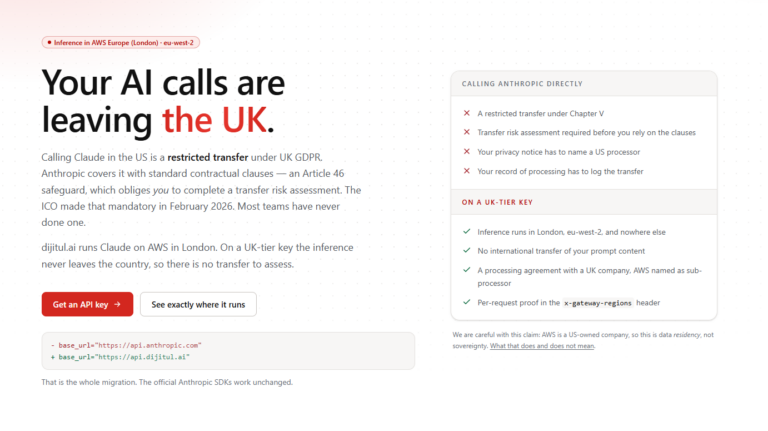
Location is only half the story. Whatever a tool returns is sent to the AI product that asked for it, so check that product’s terms and where it processes data. If UK processing matters and you are building your own assistant on Claude, dijitul.ai runs Claude through a UK-hosted API with inference in London, from £29 a month ex VAT. Our private AI hosting page covers the wider options.
What an MCP server costs
MCP itself is an open standard, so there is no licence fee for the protocol.
| Cost | Who you pay | How it is priced |
|---|---|---|
| Scoping and build | Your developer | With dijitul developments, a fixed quote after a free chat. No published price |
| Hosting | Your host | With dijihost, quoted per server after a short technical review |
| AI product plans | Anthropic, OpenAI or Microsoft | Per user or by usage. Check the vendor’s pricing page |
| Model usage | The model provider | Per token, and only if you build your own assistant |
| Maintenance | Your developer | The specification has been revised several times since 2024, so budget for reviews |
| Staff time | You | A pilot group, a written policy and someone reading the logs |
The cheapest sensible first phase is a read-only MCP server for one system, used by a small pilot group. If the logs show it earning its keep, add write tools as a second phase.
When you do not need an MCP server
We would rather tell you now than after a quote.
- Staff only want help drafting and summarising. A business AI plan and a short AI acceptable use policy will do. Our post on staff using ChatGPT at work explains why.
- The steps never vary. A fixed workflow is cheaper, faster and easier to test than an assistant deciding what to do. A tool such as n8n, which dijihost offers as self-hosted n8n hosting, often fits better.
- It is a one-off question. Export a spreadsheet, remove the personal data and ask.
- The data is a mess. An assistant pointed at five versions of the same policy gives five answers. Tidy up first.
- Nobody will own it. An MCP server with no named owner goes stale within months.
A safe first project, step by step

- Pick one system and one question staff ask every day.
- Write the tool list: what each tool reads or changes, and who may use it.
- Decide how people sign in. Your existing Microsoft 365 or Google Workspace accounts are usually the answer.
- Build a read-only MCP server and give it to a small pilot group.
- Read the logs weekly.
- Add one write tool, with an approval step, and repeat.
- Update your AI policy so staff know which assistant is approved and what it can reach.
The mistakes to avoid are the mirror image: a demo left running on a laptop, write access on day one, no logs, and a rule typed into the prompt and treated as a control. Telling a model “do not delete anything” is a request. Removing the delete tool is a control.
Our AI services page covers the wider picture, and the dijitul network shows which of our sites does what.
Talk to us
If you want AI connected to a system and are not sure whether an MCP server is the right answer, call us on 01623 650333, Monday to Friday, 09:00 to 17:30, or use the contact page. We are based in Mansfield and work with businesses across the UK. The build is done by dijitul developments and the hosting by dijihost. The first chat is free, and if a simpler option will do, we will say so.
Frequently asked questions
What is an MCP server in simple terms?
It is a connector between an AI assistant and one of your business systems. It offers the assistant a fixed list of things it may do, such as look up an order or search a policy library, and nothing else. MCP stands for Model Context Protocol, an open standard first published by Anthropic in November 2024.
Is it safe to connect ChatGPT or Claude to our business systems?
It can be, if the MCP server is built carefully. Each person signs in as themselves, the assistant starts with read-only access, anything that changes data needs a person to approve it, and every call is logged. The main risk is prompt injection, where hidden text in an email or document tries to steer the AI.
Can the AI change or delete data in our systems?
Only if someone builds a tool that lets it. A well designed MCP server starts with read-only tools and adds write tools one at a time, each with a confirmation step. OpenAI’s documentation says ChatGPT currently asks for manual confirmation before a write action. We would still leave deletions, payments and bank detail changes out altogether.
Does an MCP server have to be on the public internet?
For Claude’s custom connectors, usually yes. Anthropic says the connection comes from its cloud and not from the user’s device, so it must be reachable over HTTPS or your firewall must allow Anthropic’s IP addresses. Your core systems stay private behind it.
Do we need a developer to set up an MCP server?
For an official connector from your software supplier, often not: an administrator adds it in the AI product’s settings. For an in-house system, or anything that needs your own permissions and logging, yes. That work is ordinary integration engineering, and it is where most of the safety comes from.
How much does an MCP server cost?
There is no licence fee for the protocol itself. You pay for the build, the hosting, your AI product subscriptions and some maintenance. For the build, dijitul developments gives a fixed quote after a free chat and does not publish a price, because the work depends on how many systems and tools are involved. Hosting through dijihost is quoted per server.
Is MCP owned by Anthropic?
Not any more. Anthropic created it and released it as an open standard on 25 November 2024. In December 2025 it donated the protocol to the Agentic AI Foundation, a fund under the Linux Foundation. That matters to buyers because an MCP server built to the standard is not tied to one AI vendor.
Written in November 2026. dijitul is a digital agency based in Mansfield, working with businesses across the UK since 2006. All prices exclude VAT. Photos by Andrea Piacquadio, Christina Morillo and panumas nikhomkhai via Pexels.
Olly Mooney founded dijitul in 2006 and has been building websites since 1996, working on web design, SEO, marketing and hosting for UK businesses from Mansfield. Big car fan.
More about Olly