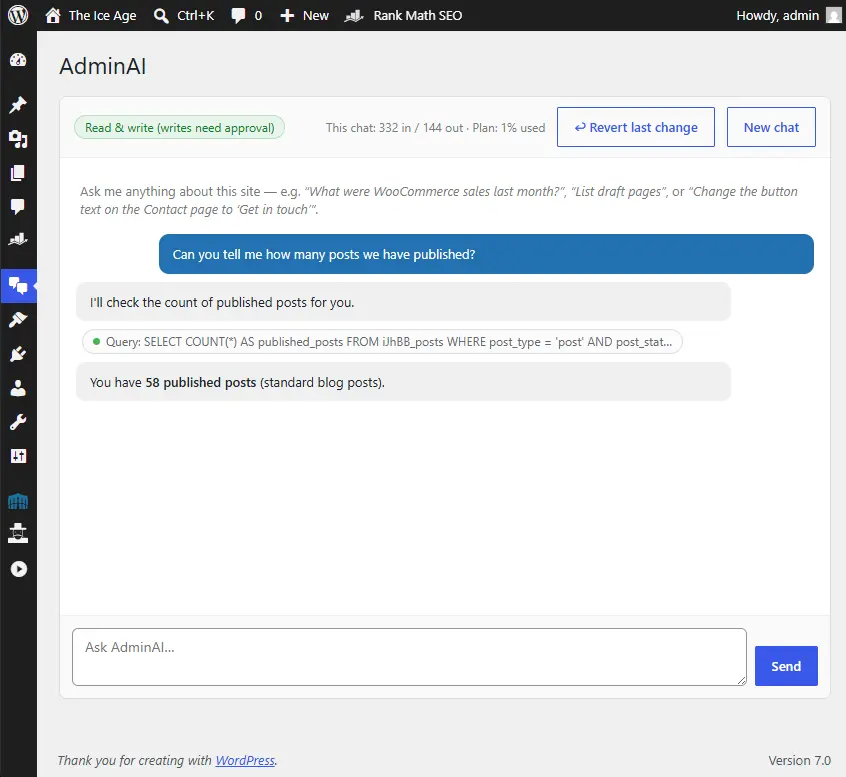
What if you could manage your WordPress site just by asking? Not hunting through menus, not learning where WooCommerce hides that report, not booking a developer for a five-minute change — just typing what you want in plain English. What you need, is a WordPress Admin AI Assistant!
That’s exactly what AdminAI does. It’s a new plugin from dijitul that puts an AI assistant directly inside your WordPress dashboard — one that can actually see your site’s data and, with your permission, act on it.
Ask it anything about your site
AdminAI connects securely to your site’s database, so it answers with your numbers, not generic advice:
- “What were our WooCommerce sales last month, broken down by week?”
- “Which products are low on stock?”
- “How many enquiries came through our contact form this month?”
- “Which pages haven’t been updated in over a year?”
Seconds later you get a clear answer, often with a tidy table — no exports, no spreadsheets, no waiting.
And ask it to make changes, too
This is where AdminAI goes beyond a chatbot. Ask it to “change the button on the contact page to say ‘Get in touch’” or “set the homepage heading to…” and it will find the right content — whether your site is built with the block editor or Elementor — and prepare the change.
Crucially, nothing changes without your say-so. Every edit pauses in the chat and shows you exactly what’s about to happen, with Approve and Reject buttons. You stay in control; the AI does the legwork.
Built with safety first
- Approval on every change — reads are instant, writes always ask first.
- One-click revert — made a change and don’t like it? Hit “Revert last change”, or undo any individual change from the activity log.
- Full activity log — every change is recorded: who approved it, what ran, and when.
- Admins only — AdminAI is only available to site administrators, and your conversations aren’t stored on the site.
- Read-only mode — want reporting without any editing at all? Lock it down with one switch.
It adapts to your site
No two WordPress sites are the same, so AdminAI doesn’t assume. It inspects what your site actually runs — WooCommerce, Elementor, Gravity Forms, custom plugins, bespoke database tables — and works with what it finds. One plugin, any setup.
Simple packages, no surprises
AdminAI comes in three straightforward packages based on how much you use it each month. Usage is visible right in the dashboard, and if you’re getting close to your allowance we’ll let you know — upgrading is a quick request, not a checkout.
| Package | Best for |
|---|---|
| Starter | Everyday admin assistance — reports, lookups and occasional changes. |
| Business | Sites using AdminAI daily — heavier reporting and content work. |
| Agency | High-volume use across large WooCommerce and content sites. |
Get AdminAI on your site
We install AdminAI, connect it, and tailor it to your site — then you just start asking. It’s available now for sites we build and manage, and we’re onboarding new sites every week.
Prefer email? Drop us a line at [email protected] and we’ll show you what AdminAI can do with your site’s data.
WordPress Admin AI FAQs
Can AI really manage a WordPress site for me?
Yes — with the right guardrails. AdminAI adds an AI assistant to your WordPress dashboard that can pull reports, answer questions about your site’s data and make content changes, all from a chat. It connects to your site’s actual database, so it works with real numbers rather than guesses. You stay in charge: the AI proposes, you approve.
Is it safe to let an AI make changes to my website?
With AdminAI, nothing is ever changed automatically. Every edit pauses and shows you exactly what’s about to happen before you click Approve — and every approved change is recorded in an activity log with a one-click revert if you change your mind. Access is restricted to site administrators, and a read-only mode is available if you only want reporting. Reading data (for reports and stats) never modifies anything.
Does it work with WooCommerce, Elementor and my other plugins?
Yes. AdminAI doesn’t rely on a fixed list of integrations — it inspects what your site actually runs and adapts. It understands WooCommerce orders and sales data (including the newer high-performance order storage), can edit Elementor page content, read Gravity Forms entries, and work with bespoke plugins and custom database tables. If your data is in WordPress, AdminAI can find it.

Founder of dijitul. Building websites since 1996 and running dijitul from Mansfield since 2006.