

With inbox placement becoming increasingly complex, authentication standards tightening, and mailbox providers constantly adjusting their filtering systems, simply sending an email is no longer enough. If your DNS, SPF, DKIM or DMARC records are even slightly misconfigured, your emails can quietly land in spam or fail completely.
Over the past year I have spent a huge amount of time improving deliverability for hosting customers. I have written about Email Health and explained why being listed on the UCEPROTECT Level 3 blacklist is often misunderstood. What became obvious very quickly was this:
Even experienced developers struggle to get consistently high deliverability scores.
That is why I built a completely free email testing tool.
And yes, I somehow managed to secure the perfect domain name for it.
Welcome to Mail-Tester.co.uk.
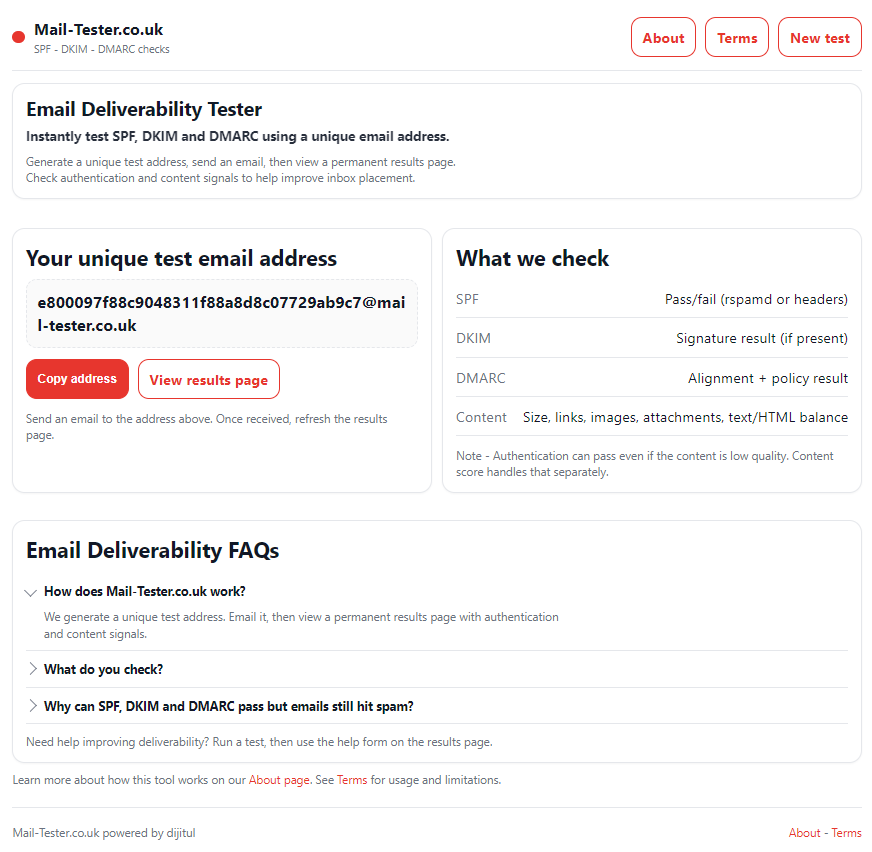
This email testing tool is designed to give you instant insight into how well your email system is configured. It is completely free to use.
Here is how it works:
- Visit the website.
- Copy the unique email address provided.
- Send an email to that address.
- Return to the page and click results.
Do not close the page while waiting.
As soon as the system receives your message, it analyses:
- SPF configuration
- DKIM signature validity
- DMARC policy alignment
- Message headers
- Sending IP reputation
- Basic content signals
- Technical authentication errors
Within seconds, you get a clear grade and detailed feedback explaining exactly what needs improving.
No sign up required. No limits. No hidden paywalls.
Why Most Email Testing Tools Fall Short
There are plenty of email deliverability test platforms available. However, many impose limits or restrict advanced results unless you pay. When you manage hosting infrastructure daily, those limits get frustrating quickly.
Different providers interpret authentication differently:
- Gmail checks alignment strictly.
- Outlook can be more sensitive to IP reputation.
- Yahoo may react strongly to missing DMARC policies.
- BT can filter aggressively on weaker SPF setups.
Achieving consistently strong scores across all providers is harder than most people realise. This email testing tool was built specifically to remove usage limits and provide accurate technical grading without friction.If your emails are not reaching inboxes, guessing will not fix it.
You need data.
This email testing tool helps you:
- Identify missing SPF records
- Detect invalid DKIM signatures
- Confirm DMARC enforcement policies
- Spot alignment issues
- Check authentication formatting errors
- Understand why you are losing points
Once you know the issue, it is usually a straightforward fix inside your DNS zone or mail server configuration. If you are running your own VPS, reseller hosting or dedicated infrastructure, you will find this particularly useful. If you are unsure what the results mean, there is a built-in form on the results page. You can send your report directly for advice on how to improve your configuration.
Free Email Testing Tool With No Usage Limits
One of the biggest frustrations with traditional email deliverability testing tools is hitting daily limits.
Testing SPF changes.
Testing DKIM rotations.
Testing DMARC policy updates.
Testing after IP warming.
The process is iterative.
You adjust.
You test.
You adjust again.
That is why this email testing tool has no artificial caps. You can test as often as you need while fine tuning your setup.
Who Should Use This Email Testing Tool?
This tool is ideal for:
- Web hosts
- Developers
- Agencies
- E-commerce store owners
- SaaS founders
- IT managers
- Anyone sending transactional or marketing email
If you rely on email for invoices, password resets, lead notifications or customer communication, you cannot afford poor authentication. Deliverability is not optional anymore. It is foundational infrastructure.
How To Get Higher Email Testing Tool Scores
If you want to achieve near perfect results, focus on:
- Correct SPF syntax with minimal includes
- DKIM keys of at least 2048 bits
- DMARC policy set to quarantine or reject
- Proper alignment between From and Return-Path domains
- Reverse DNS matching your sending hostname
- Clean server IP reputation
A useful external reference for understanding authentication standards can be found on organisations such as M3AAWG, who focus on global messaging best practice.
If you need help implementing changes, guidance is available through the results form.
Why Mail-Tester.co.uk Was Built
This project was born out of necessity. Repeatedly hitting limits on other platforms while working on live hosting environments was slowing everything down. So instead of complaining about it, I built something better.
The aim was simple:
Create a fast, accurate, unlimited email testing tool that anyone can use without friction.
- It is free.
- It is simple.
- It works.
And more tools are coming soon.
FAQs About This Email Testing Tool
Is this email testing tool really free?
Yes. There are no hidden limits or subscription tiers. You can run as many tests as you need while configuring your system.
What does the email testing tool check?
It analyses SPF, DKIM, DMARC, header integrity, authentication alignment and technical sending configuration to grade deliverability performance.
How can I improve my email testing tool score?
Focus on tightening SPF records, ensuring DKIM is signing correctly, enforcing a DMARC policy and confirming your server IP has proper reverse DNS configured. Small DNS adjustments often make a big difference.
If you send email from your own infrastructure, or even through third-party platforms, testing is critical.
This free email testing tool gives you instant clarity and control.
Try it now at Mail-Tester.co.uk and see how your configuration scores.
Leave a Reply