

I have written a few posts recently about emails, email deliverability, email health and email systems in general. A question that comes up time and time again is a very simple one:
How do you check if your emails are actually getting through to the people you are sending them to?
Most of us have been there. You send an important email and then start wondering.
Why have they not replied?
Did it land in spam?
Should I call them just to check they received it?
It is frustrating, and it is also a completely valid concern.
Over the last couple of years, major email providers like Microsoft, Google, and Yahoo have significantly tightened their requirements around email authentication. If anything about your domain, DNS records, server, or sending reputation is not quite right, your emails can be delayed, filtered, or silently dropped into spam folders without you ever knowing.
So what can you actually do right now to check the health of your emails?
Why Email Deliverability Is Harder Than It Used to Be
Email providers no longer just look at the content of an email. They assess dozens of signals before deciding whether to deliver it to the inbox.
These include:
- Whether your domain has valid SPF, DKIM, and DMARC records
- The reputation of the server or IP sending the email
- How often your emails are marked as spam
- Whether your emails look like genuine human messages or automated junk
- The overall trust history of your domain
If even one of these areas is weak, your emails can struggle to reach inboxes, even if they look fine on the surface.
This is why simply sending a test email to yourself is not always enough.
The Easiest Way to Check Your Email Health
Fortunately, there are free tools available that make checking your email health much easier.
By far the best one, and my personal go-to, is Mail-Tester.
Mail-Tester gives you a unique email address that you send a test email to. Once the email is received, the tool analyses it and gives you a clear score along with detailed feedback.
How to Use Mail-Tester Properly
The process is simple, but there is one important thing to be aware of.
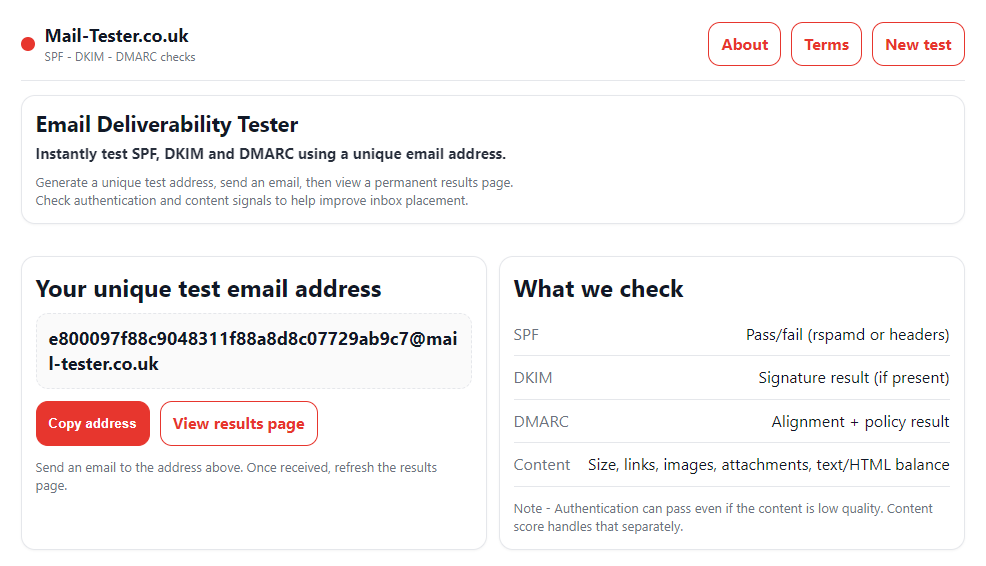
- Visit the Mail-Tester website: https://mail-tester.co.uk
- Copy the email address shown on screen. This address is unique to you
- Send a normal email to that address from your email account
- Do not close the Mail-Tester page while doing this
- Go back to the page and click the button to check your score
If you close the page, a new email address is generated and your test will not match.
Once the test runs, you will see a score out of 10 along with a breakdown explaining exactly what is right and what needs improving.
What Your Score Actually Means
If your score is high, great news. It means your emails are technically sound and should be reaching most inboxes without issues.
If your score is low, do not panic.
Low scores are usually caused by missing DNS records, minor configuration problems, or hosting issues that are straightforward to fix once identified. This is exactly the kind of thing these tools are designed to highlight.
A low score does not mean your email system is broken beyond repair. It just means it needs attention.
Other Reasons Emails May Still Not Arrive
Even with a perfect score, there are still situations where emails may not reach someone.
For example:
- The recipient’s company may block emails internally
- The email address could be misspelt or outdated
- The recipient’s mailbox may be full
- Their IT team may have aggressive filtering rules
If you are consistently unsure, or if your Mail-Tester score comes back low, this is where professional help can save you a lot of time and frustration.
If you are worried about your email health & deliverability, or want help improving your score, get in touch with us and we will happily take a look.
Email Health FAQs
How often should I check my email deliverability?
You should check it whenever you change hosting, update DNS records, switch email providers, or notice a drop in replies. Running a test every few months is also a good habit.
Can a good Mail-Tester score guarantee inbox delivery?
No tool can guarantee inbox placement, but a strong score means your technical setup is correct and you are not giving email providers a reason to block or filter your messages.
Why do my emails work for some people but not others?
Different companies and providers use different filtering rules. An email that reaches Gmail inboxes may still be blocked by a corporate Microsoft or on-premise email system.
Leave a Reply